


In this article I will show, how to install Maven in windows machine.
Maven is the tool mainly used to build the project Java projects. You can get more information about maven from http://maven.apache.org/what-is-maven.html
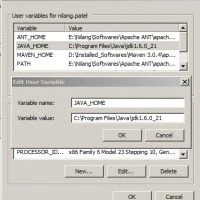
JDK needs to be installed before Maven installed. Also make sure that JAVA_HOME environment variable is pointing to JDK.
Once its done, download Maven from its official site http://maven.apache.org/download.html
download Binary Zip file and extract it on local folder (ex. c:/maven)
Set MAVEN_HOME to installed location (c:/maven in our case) same as we have done for JAVA_HOME
Now double click on PATH variable and add %MAVEN_HOME%bin at the end. Don’t forget to put semicolon (‘;’) before putting %MAVEN_HOME%bin
For example is PATH is set as D:softSSH then first put semicolon (‘;’) and then put %MAVEN_HOME%bin so that it will be looks like D:softSSH;%MAVEN_HOME%bin
Once this done, just open command prompt and type mvn -version. Maven successfully get installed If you are able to get following things on command prompt.
Maven is the tool mainly used to build the project Java projects. You can get more information about maven from http://maven.apache.org/what-is-maven.html
JDK needs to be installed before Maven installed. Also make sure that JAVA_HOME environment variable is pointing to JDK.
Once its done, download Maven from its official site http://maven.apache.org/download.html
download Binary Zip file and extract it on local folder (ex. c:/maven)
Set MAVEN_HOME to installed location (c:/maven in our case) same as we have done for JAVA_HOME
Now double click on PATH variable and add %MAVEN_HOME%bin at the end. Don’t forget to put semicolon (‘;’) before putting %MAVEN_HOME%bin
For example is PATH is set as D:softSSH then first put semicolon (‘;’) and then put %MAVEN_HOME%bin so that it will be looks like D:softSSH;%MAVEN_HOME%bin
Once this done, just open command prompt and type mvn -version. Maven successfully get installed If you are able to get following things on command prompt.