

Finder method in Liferay provides facility to add customization in service layer. Finder method allows to define custom methods which is used to fetch data from DB for different table column.
In this article we will see some useful trick to add custom method in service layer. We will go ahead with the same example that we took in Creating Service layer with Service builder in Liferay article, So I recommend to go through it before starting this article.
Follow all the steps in last article (Creating Service layer with Service builder in Liferay) and create the student entity. After service build, it will create the StudentLocalSerciceUtil class with following methods.
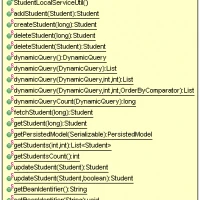
For example, If I want to fetch all the students who are in standard 8, there is no direct method available. At max, we can call getStudents method (Which will return all students), and then from the list, we can take the 8th standard student programmatically. But this is not an efficient way. In the case of let say, 10000 students, if the total no of 8th standard student is just 30, then there is no meaning to fetch all 10000 students.
Liferay provides a finder method technique to achieve this. Let us see how to write the finder method.
So far now, we have created the student entity as per the below snippet(I am omitting the DTD definition).
<entity name="Student" local-service="true" remote-service="false">
  <column name="studentId" type="long" primary="true" />
  <column name="name" type="String" />
  <column name="age" type="int" />
  <column name="fatherName" type="String" />
  <column name="motherName" type="String" />
  <column name="standard" type="int" />
 </entity>
Add finder method
We are going to add the finder method to this entity. Generally, finder methods are built on columns so first we need to identify on which column(s) we want finder methods.
I would recommend looking at the index page ‘A Complete Liferay Guide‘ to browse all topics about Liferay.
In our case, we want to search for all the students who are from the 8th Standard. So we will write the finder method on column standard. We will add the finder element for standard column so that finally it will look like the below snippet.
<entity name="Student" local-service="true" remote-service="false">
  <column name="studentId" type="long" primary="true" />
  <column name="name" type="String" />
  <column name="age" type="int" />
  <column name="fatherName" type="String" />
  <column name="motherName" type="String" />
  <column name="standard" type="int" />

  <finder return-type="Collection" name="Standard">
   <finder-column name="standard"/>
  </finder>
 </entity>
Explanation:-
- We have defined one element (finder) inside student entity. This will create finder method for column standard.
- The value of return-type is Collection which means that the return type of finder method will be List<T>.
- The value of name attribute will be used to construct finder method name. We gave Standard so the generated finder method name will be findByStandard().
- Note:- You can give any value in name attribute of <finder> element. The only thing you need to make sure it to give first letter as capital. It will still work if you give first letter small. But then the method name become findBystandard() which should be findByStandard() (Camel Case as Java coding standard).
- <finder-column> element Inside the <finder> element represents the column name.
- the name attribute of <finder-column> element represents the name of the column. It should have the exact same name as <column>’s name attribute of which we want finder method.
Now run the service builder by ant build-service command and refresh the page. After running it, the finder method won’t be directly created inside StudentLocalServiceUtil class. The finder method will be created inside
- StudentPersistence.java (under /WEB-INF/service/com/opensource/techblog/myservice/service/persistence/)
- StudentPersistenceImpl.java (under WEB-INF/src/com/opensource/techblog/myservice/service/persistence).
/**
  *
  * @param standard
  * @return List<Student>
  * @throws SystemException
  */
 public List<Student> getStudentForStandard(int standard) throws SystemException{
  return this.studentPersistence.findByStandard(standard);
 }
Explanation:-
- We first declare method (getStudentForStandard) which takes standard as input and return the list of the students who are for a specific standard.
- The name of the method can be taken as anything that you feel relevant since it’s our custom method. The same signature method will be created in StudentLocalServiceUtil class on the next service build. The method inside the StudentLocalServiceUtil will call the corresponding method of StudentLocalServiceImpl class.
- Next we are calling this.studentPersistence.findByStandard method.
- This is because StudentLocalServiceImpl method extends StudentLocalServiceBaseImpl class and this (StudentLocalSeriveBaseImpl) class having reference of persistence (StudentPersistence) class.
- After the first service run the finder method is created in the persistence (StudentPersistence) class which is accessible now in StudentLocalServiceImpl class.
- So we are simply calling the finder method from the persistence class and pass the standard which gives the list of students for that particular standard which finally we return of this method (getStudentForStandard).
- Next, just run the service builder once again and refresh the project structure. This time you will observe that the corresponding method (with the same signature as what we defined in StudentLocalServiceImpl class) is created for StudentLocalServiceUtil class as per the below screenshot.

- It has the same method signature that we defined in StudentLocalServiceImpl class.
- It will internally call the corresponding method of service class.
- If you do any change in the method signature defined in StudentLocalServiceImpl, it will create a new method in StudentLocalSericeUtil class. The old method will not be vanished.
Summing Up
- Finder methods are the way to define customization in the service layer provided by Liferay
- It allows adding additional methods to fetch data from the database
- We can get data from one or more DB columns with a specific value.

hey hi nilang will please tell about query mapping or table mappin like many to many in liferay service builder?
how to write join query between tables?
Thank you for great and easy article.
Hello Prasanna,
Sorry for late respond. Ideally when you need to fetch data from multiple tables, I would prefer to write custom query. In case if there are multiple joins are there, you can shift it to Stored procedure for faster recovery of data. I am planning to write separate blog on how to write custom sql query with service builer but you can find the help from google for time being.
Regards
Nilang
Hi Dhaval,
Thank you for your sharing.
It’s very helpful for me. However, I met an issue when deploy service builder to portal.
After I inserted method to StudentServiceImpl (remote API), I could see my api in http://localhost:8080/api/jsonws.
Do you think I should build service.xml again?
Thank you for your help!
Tung Nguyen
Hi Nilang,
I’ve done the steps as your post, however I encountered some error “org.hibernate.HibernateException: No Hibernate Session bound to thread, and configuration does not allow creation of non-transactional one here
at org.springframework.orm.hibernate3.SpringSessionContext.currentSession(SpringSessionContext.java:63) ….”,
can you help me this problem?
Thanks a Lot.
Hi Sinh,
Can you please provide steps you are following. Also send me your portlet on my email address [email protected]
Hi nilang,
Can you please reply for the above comment.
Thanks in advance
Hi nilang, I have created a EXT in which i have written a custom interceptor extending methodinterceptor. so that this interceptor should be called for my service calls in all portlets. and this is being called for customservices provided by liferay like userlocalservice..but it is not getting called for custom services. please help me out.
Thanks in advance
excellent nilang excellent..awesome…i cant express my joy. am newbie to liferay struggling fr hours in office to understand all these concepts..please post articles on ext plugins also. it will help us a lot..
Hi Welcome to tech blog and thanks for appreciation.
Regards
Nilang
hello follow the whole process but I have to edit my view.jsp to add a button or text field?
HelpMe
Superb,Excellant you are doing a gr8 job,
Such a detailed post ,its like spoonfeeding to newbies in Liferay ,
Really please keep on posting it is really helpful to us .
Thanks a Lot.
A post on IPC concept,Hooks,ExtPlugins and little theory on them would be really appreciated …waiting for that post too, hope you will write on this topics too.
Hi Dhaval,
Thanks for appreciation !! and welcome to Tech blog. Since beginning I keep all article such that any person can easily understand. As you suggest, I will sure write the blogs for the topics you suggest.
Regards
Nilang I Patel