
Monday, 29 December 2014
create render URL By Java Script (AUI module - Liferay.PortletURL)
AUI
,
Liferay Development
,
Liferay.PortletURL
,
Render
,
Render Phase
,
Render URL
No comments
:
In this article, we will create render URL in Javascript. Liferay ships with Java script framework called AUI (Alloy UI - http://alloyui.com). AUI is modular framework and provides various modules to create components in Java script.
First of all, we will create LiferayMVC portlet. You can refer separate blog on Creating MVC Portlet in Liferay to create project structure as per below screenshot.
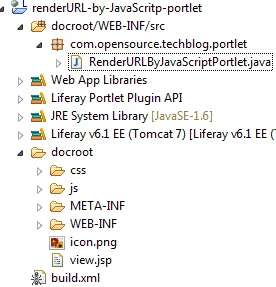
I gave plugin project name as renderURL-by-JavaScritp and -portlet will be appended by Liferay IDE while creating Liferay plugin project. I gave portlet class as com.opensource.techblog.portlet.RenderURLByJavaScriptPortlet
Add following code in RenderURLByJavaScriptPortletclass.
Add following code in view.jsp
Explanation:-
First of all, we will create LiferayMVC portlet. You can refer separate blog on Creating MVC Portlet in Liferay to create project structure as per below screenshot.
Add following code in RenderURLByJavaScriptPortletclass.
//define log for this class
  private static final Log _log = LogFactoryUtil.getLog(RenderURLByJavaScriptPortlet.class.getName());

  @Override
  public void render(RenderRequest request, RenderResponse response)
  throws PortletException, IOException {
   _log.info(" This is render method of RenderURLByJavaScriptPortlet");

    String data = request.getParameter("param");
    String data1= ParamUtil.getString(request, "param","");
    System.out.println("parameter with request.getParameter is =>"+data);
    System.out.println("parameter with ParamUtil.getString is =>"+data1);

   super.render(request, response);
  }
Explanation:-- We are simply reading request parameter and displaying it in logger.
To create portlet URL with AUI (javascript), we will use liferay-portlet-url module of AUI.
Add following code in view.jsp
<%@page import="com.liferay.portal.kernel.portlet.LiferayWindowState"%>
<%@page import="com.liferay.portal.kernel.portlet.LiferayPortletMode"%>
<%@ taglib uri="http://java.sun.com/portlet_2_0" prefix="portlet" %>
<%@ taglib uri="http://liferay.com/tld/aui" prefix="aui" %>
<%@ taglib uri="http://liferay.com/tld/theme" prefix="liferay-theme" %>

<liferay-theme:defineObjects/>
<portlet:defineObjects />

<a id="renderURLWithJS" href=""> This render URL link is created with Javascript</a>

<aui:script>
 AUI().use('liferay-portlet-url', function(A) {
  var renderUrl1 = Liferay.PortletURL.createRenderURL();
  renderUrl1.setWindowState("<%=LiferayWindowState.NORMAL.toString() %>");
  renderUrl1.setParameter("param","This value comes from Javascript");
  renderUrl1.setPortletMode("<%=LiferayPortletMode.VIEW %>");
  renderUrl1.setPortletId("<%=themeDisplay.getPortletDisplay().getId() %>");

  A.one("#renderURLWithJS").set('href',renderUrl1.toString());
  alert("renderUrl1 is ->"+renderUrl1.toString());
});
</aui:script>
Explanation:-
- First few lines are imports and taglib definition.
- portlet and liferay-theme taglibs are defined to place <liferay-theme:defineObjects/> and <portlet:defineObjects/> tags. These tags are used to make portlet implicit and liferay implicit objects available in JSP respectively.
- aui taglib is used to define <aui:script> tag, were we placed AUI code.
- Next we added a new link. Note that we intentionally keep href blank at this moment. We will construct render URL and then assign to href with JavaScript during page load.
- We have used <aui:script> tag to place all AUI code. This tag internally create <script> tag and make AUI core modules ( like node) ready to use.
- In <aui:script>, the code is written like AUI().use('liferay-portlet-url', function(A) {
- AUI is modular framework. To use specific module, it needs to register by declaring it in AUI().use method. More than one modules can be declared by comma separate in AUI().use.
- In our case, liferay-portlet-url module is used to create render URL so we have registered it.
- in callback function(A), we have created render URL with following JS code.
- var renderUrl1 = Liferay.PortletURL.createRenderURL();
- Javascript variable Liferay.PortletURL provides various methods to create different kind of portletURL. Here we need to create render URL so we called createRenderURL() method.
- then we set window state and portlet mode to this render URL. Any additional parameter can be passed by calling setParameter method.
- at the end, we set this render URL to href by following code
- A.one("#renderURLWithJS").set('href',renderUrl1.toString());
- A in AUI is a placeholder to apply selector. its similar like $ in JQuery.
- We passed #renderURLWithJs (id of link) to A.one and then set its href value to generated render URL by renderUrl1.toString();
- Just debug purpose, I kept alert at the last.
- We also can create render URL to point different portlet by setting its portletId in generated render URL(in setPortletId method).
- In this render URL, we have passed current portlet's Id by calling themeDisplay.getPortletDisplay.getId() which returns current portlet's Id. themeDisplay is liferay implicit object which is available by adding <liferay-theme:defineObjects/> tag.
Save view.jsp and re-deploy the portlet. Once portlet is deployed, refresh page, click on the link and you will see the parameter that we set in renderURL with AUI in server console.
Conclusion:-
- AUI module 'liferay-portlet-url' is used to create render URL.
- We can set portlet mode and window state while creating renderURL
- We can pass additional parameter by calling setParameter method on generated render URL.
- Since renderURL created by JavaScript on client side, in some cases, due to security reason, renderURL may not having host name. Please refer this link for more information.
Following are other possible ways to create render URL in Liferay
I would recommend looking at index page 'A Complete Liferay Guide' to browse all topics about liferay.


create render URL by Portlet Tag () in JSP
Liferay Development
,
Portlet Tag
,
portlet:renderURL
,
Render
,
Render Phase
,
Render URL
No comments
:
In this article, we will see how to create renderURL with the the help of portlet tag. Render URL is used to call render() phase / lifecycle method of portlet.
Sun provides implementation of portlet API in portlet.jar file. This jar file contains classes and interfaces under javax.portlet pacakage. This implementation (given in portlet.jar file under tomcat/lib/ext path for Liferay server) provides certain custom tags to create Render URL.
First we will create LiferayMVC portlet. You can refer separate blog on Creating MVC Portlet in Liferay to create project structure. I gave plugin project name as renderURL-by-portletTag and -portlet will be appended by Liferay IDE while creating Liferay plugin project. I gave portlet class as com.opensource.techblog.portlet.RenderURLByPortletTagPortlet
Once portlet plugin project is created by eclipse (Liferay IDE), it will create view.jsp under docroot folder. We will add portlet tag in this jsp. To avail this tag in view.jsp, we need to add following taglib definition.
While creating portlet with Eclipse (Liferay developer studio), this will be added by default at the time of project creation (Smart work done by eclipse).
Sun provides implementation of portlet API in portlet.jar file. This jar file contains classes and interfaces under javax.portlet pacakage. This implementation (given in portlet.jar file under tomcat/lib/ext path for Liferay server) provides certain custom tags to create Render URL.
First we will create LiferayMVC portlet. You can refer separate blog on Creating MVC Portlet in Liferay to create project structure. I gave plugin project name as renderURL-by-portletTag and -portlet will be appended by Liferay IDE while creating Liferay plugin project. I gave portlet class as com.opensource.techblog.portlet.RenderURLByPortletTagPortlet
Once portlet plugin project is created by eclipse (Liferay IDE), it will create view.jsp under docroot folder. We will add portlet tag in this jsp. To avail this tag in view.jsp, we need to add following taglib definition.
<%@ taglib uri="http://java.sun.com/portlet_2_0" prefix="portlet" %>
While creating portlet with Eclipse (Liferay developer studio), this will be added by default at the time of project creation (Smart work done by eclipse).
Once this is done, add following code in view.jsp
<portlet:renderURL var="renderUrl"
 windowState="<%=LiferayWindowState.NORMAL.toString() %>" copyCurrentRenderParameters="true" portletMode="<%=LiferayPortletMode.VIEW.toString()%>">
 <portlet:param name="param" value="Nilang"/>
</portlet:renderURL>

<a href="${renderUrl}">RenderURL Created by Portlet Tag</a>
Explanation:-
- <portlet:renderURL> tag is used to create render URL. This render URL is pointing to portlet in which its created (same portlet).
- var attribute of <portlet:renderURL> tag is used to define a variable that holds the generated renderURL. This variable is available in page scope so that it can be accessed by EL (Expression Language) anywhere in JSP.
- In above case, renderUrl variable holds generated renderURL.
- windowState represents current state of portlet. following are possible window state
- Maximize,Minimize, Normal,POP_UP
- PortletMode represents current portlet mode.
- Following are possible portlet modes
- Modes defined by portlet specification and provided by default implementation (portlet.jar)
- View,Edit,Help
- Additional modes provided by Liferay.
- Configuration,About,Edit_Default,Edit_Guest,Preview,Print
- copyCurrentRenderParameters :- This attribute decide if all render parameters are available in complete request cycle. By default its false. This is more understandable for action URL.
- Additional parameters can be passed with <portlet:param> tag. Such parameters are accessible by renderRequest.getParameter API in portlet's render method.
- At the end, we have created link by anchor tag and set its href to renderUrl variable ( created by <portlet:renderURL> tag which holds renderURL ) through EL(Expression Language).
- You need to add following import in view.jsp
<%@page import="com.liferay.portal.kernel.portlet.LiferayPortletMode"%>
<%@page import="com.liferay.portal.kernel.portlet.LiferayWindowState"%>
To understand how we can access parameters added by <portlet:param> to renderURL in render() method, I have override render() method which is now looks like below code snippet. To understand more about render() method, please refer my another blog Portlet Lifecycle method - render()
//define log for this class
private static final Log _log = LogFactoryUtil.getLog(RenderURLByPortletTagPortlet.class.getName());

 @Override
 public void render(RenderRequest request, RenderResponse response)
   throws PortletException, IOException {
  _log.info(" This is render method of RenderURLByPortletTagPortlet");
  String data = request.getParameter("param");
  String data1= ParamUtil.getString(request, "param","");
  _log.info("parameter with request.getParameter is =>"+data);
  _log.info("parameter with ParamUtil.getString is =>"+data1);
  super.render(request, response);
 }
Explanation:-
- additional parameter we have added in renderURL (by <portlet:renderURL>) can be accessed with request.getParameter method.
- There is another way to read the parameters. Liferay provides ParamUtil class to access request parameter. This class has many convenience methods which are used to get parameter value in desire output like,
- getBoolean, getFloat, getString etc
- These methods also facilitate to pass default value at the end. In case if parameter is not exist, whatever default value we set will be returned (instead of null value)
- In our case request.getParamer and ParamUtul.getString both are similar (will return same value).
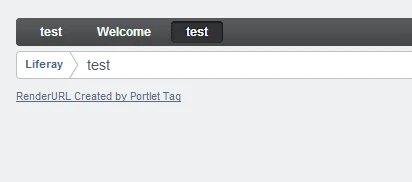
- On refreshing this page, we will get following logs in server console
parameter with request.getParameter is =>null
parameter with ParamUtil.getString is =>
- During the page refresh, render() method is called directly. At this time, there are no parameters passed so we will not get any parameters.
- You can observe that request.getParameter method returns null in case the parameter is not exist while ParamUtil.getString method simply returns empty string (Default value "").
- ParamUtil.getString method will make developer life easy by protecting us from NullPointerException if parameter is not exist and we try to perform any operation on that.
- Now click the link shown above and you will get below logs in server console.
parameter with request.getParameter is =>Nilang
parameter with ParamUtil.getString is =>Nilang
- This time, render() method is called by renderURL so we are getting value of additional parameter in console.
- By inspecting element in browser, you will get follwing renderURL
- http://localhost:8080/web/guest/test?p_p_id=renderURLbyportletTag_WAR_renderURLbyportlet&p_p_lifecycle=0&p_p_state=normal&p_p_mode=view&p_p_col_id=column-1&p_p_col_count=1&_renderURLbyportletTag_WAR_renderURLbyportlet_param=Nilang
- Explanation:-
- p_p_id = unique portlet Id generated by portal. This is the key used to identify which renderURL points to which portlet.
- p_p_lifecycle= Represent current Lifecycle of portlet. Following are possible lifecycles
- 0 - render phase
- 1 - action phase
- 2 - serve resource phase
- We are currently in render phase so its showing 0.
- p_p_state= Represent current window state of portlet.
- p_p_mode= Represents current mode of portlets.
- p_p_col_id= Represent in which column this portlets is placed. In liferay we can define multi column layout. This parameter helps to find exact column on which this portlet is placed.
- p_p_col_count= Represents total columns count for layout of current page on which the portlet is placed.
- _portletphaselifecycle_WAR_portletphaselifecycleportlet_param1= This is the additional parameter name (param) that we have added while creating renderURL(through tag). You can observe that portlet namespace (p_p_id) is attached before each parameter name. This is useful if more than one portlets are placed on same page with same parameter name. In this case they all are uniquely identified with portlet name space attached before parameter name (Each portlet will have unique name space).
Conclusion:-
- renderURL can be created by portlet Tag. This tag is comes with implementation (portlet.jar) of portlet specification.
- We can set portlet mode and window state while creating renderURL
- We can pass additional parameter by <portlet:param> child tag inside <portlet:renderURL>
- renderURL created by <portlet:renderURL> tag is only pointing to portlet that creates it.
Following are other possible ways to create render URL in Liferay
I would recommend looking at index page 'A Complete Liferay Guide' to browse all topics about liferay.
create render URL By Liferay tag (liferay-portlet:renderURL) in JSP
Liferay Development
,
Liferay Portlet Tag
,
liferay-portlet:renderURL
,
Render
,
Render Phase
,
Render URL
No comments
:
In this article, we will see how to create render URL by liferay tag (< liferay-portlet:renderURL>). This tag works similarly with the one we created render URL by PortletURLFactoryUtil class. You can refer separate blog on how to create render URL with PortletURLFactoryUtil class.
First of all, we will create LiferayMVC portlet. You can refer separate blog on Creating MVC Portlet in Liferay to create project structure as per below screenshot.
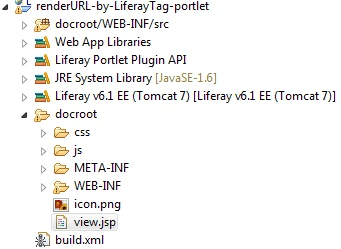
I gave plugin project name as renderURL-by-LiferayTag and -portlet will be appended by Liferay IDE while creating Liferay plugin project. I gave portlet class as com.opensource.techblog.portlet.RenderURLByLiferayTagPortlet
Add following code in RenderURLByLiferayTagPortlet class.
First of all, we will create LiferayMVC portlet. You can refer separate blog on Creating MVC Portlet in Liferay to create project structure as per below screenshot.
I gave plugin project name as renderURL-by-LiferayTag and -portlet will be appended by Liferay IDE while creating Liferay plugin project. I gave portlet class as com.opensource.techblog.portlet.RenderURLByLiferayTagPortlet
Add following code in RenderURLByLiferayTagPortlet class.
//define log for this class
private static final Log _log = LogFactoryUtil.getLog(RenderURLByLiferayTagPortlet.class.getName());
 @Override
 public void render(RenderRequest request, RenderResponse response)
 throws PortletException, IOException {
  _log.info(" This is render method of RenderURLByLiferayTagPortlet");

   String data = request.getParameter("param");
   String data1= ParamUtil.getString(request, "param","");
   System.out.println("parameter with request.getParameter is =>"+data);
   System.out.println("parameter with ParamUtil.getString is =>"+data1);

  super.render(request, response);
 }
Explanation:-- We are simply reading request parameter and displaying it in logger.
<%@ taglib uri="http://liferay.com/tld/portlet" prefix="liferay-portlet" %>
<liferay-portlet:renderURL var="openPortletURL" copyCurrentRenderParameters="true" portletMode="<%=LiferayPortletMode.VIEW.toString() %>"
  windowState="<%=LiferayWindowState.NORMAL.toString()%>">
  <liferay-portlet:param name="param" value="This is from Liferay TAG"/>
</liferay-portlet:renderURL>

<a href="${openPortletURL}">Render Url created by Liferay TAG in JSP</a>
- <liferay-portlet:renderURL> tag is used to create render URL.
- To avail this tag, we have added <%@ taglib uri="http://liferay.com/tld/portlet" prefix="liferay-portlet" %> taglib definition in this jsp.
- attribute of this tag is similar with <portlet:renderURL>. You can refer my blog on creating render URL with Portlet tag (<portlet:renderURL>).The only difference between these two tags are
- Render URL created with <portlet:renderURL> can point to current portlet only.
- Render URL created with <liferay-portlet:renderURL> can point to other portlet too. For this we need to give plid and portletName attribute for target portlet.
- If we are not providing these attribute to <liferay-portlet:renderURL> tag then it will create render URL which point to current portlet only.
- We can set window state and portlet mode similarly <portlet:renderURL>
- We can also pass additional parameter with <liferay-portlet:param> tag similarly <portlet:param> tag.
- var attribute is used to hold this render URL so that we can refer it anywhere in JSP.
- At the end we created new link and set its href with variable (var attribute defined in <liferay-portlet:param> tag) which holds render URL.
Save view.jsp and deploy the portlet. Refresh the page and you will see this link. Click on this link and you will see the paramter's (param) value ("This is from Liferay TAG") is printed in server console.
Conclusion:-
Following are other possible ways to create render URL in Liferay
Conclusion:-
- <liferay-portlet:renderURL> liferay tag used to create render URL
- We can set portlet mode and window state while creating renderURL
- We can pass additional parameter by <liferay-portlet:param> child tag just like <portlet:param> under <portlet:renderURL>.
- renderURL created by <liferay-portlet:renderURL> tag can points to same as well as other portlets.
Following are other possible ways to create render URL in Liferay
I would recommend looking at index page 'A Complete Liferay Guide' to browse all topics about liferay.
create render URL By Java API in Portlet class and JSP
Liferay Development
,
PortletURLFactoryUtil
,
Render
,
Render Phase
,
Render URL
4 comments
:
In this article, we will see how to create render URL by java API. In some situation, it is required us to create render URL in portlet class. The classic example is to create render URL of portlet A from Portlet B. If we create portlet URL by portlet tag from portlet A, then it will point to same portlet (portlet A and not to portlet B). In this case, we need to create render URL with Java API.
We will see how this works by creating LiferayMVC portlet. You can refer separate blog on Creating MVC Portlet in Liferay to create project structure like below screenshot.
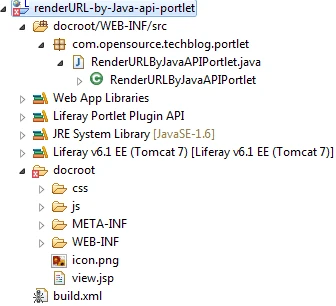
I gave plugin project name as renderURL-by-Java-api and -portlet will be appended by Liferay IDE. I gave portlet class as com.opensource.techblog.portlet.RenderURLByJavaAPIPortlet.
There are two place where we can create portlet URL with Java API.
We will see how this works by creating LiferayMVC portlet. You can refer separate blog on Creating MVC Portlet in Liferay to create project structure like below screenshot.
I gave plugin project name as renderURL-by-Java-api and -portlet will be appended by Liferay IDE. I gave portlet class as com.opensource.techblog.portlet.RenderURLByJavaAPIPortlet.
There are two place where we can create portlet URL with Java API.
Creating render URL by PortletURLFactoryUtil in Portlet class.
PortletURLFactoryUtil is util class provided by Liferay to create render URL. We can create renderURL for current as well as other portlet by this class.Add following code in render() method
//define log for this class
private static final Log _log = LogFactoryUtil.getLog(RenderURLByJavaAPIPortlet.class.getName());

@Override
public void render(RenderRequest request, RenderResponse response)
  throws PortletException, IOException {
   _log.info(" This is render method of RenderURLByJavaAPIPortlet");
   String data = request.getParameter("param");
   String data1= ParamUtil.getString(request, "param","");
   _log.info("parameter with request.getParameter is =>"+data);
   _log.info("parameter with ParamUtil.getString is =>"+data1);

   ThemeDisplay themeDisplay = (ThemeDisplay)request.getAttribute(WebKeys.THEME_DISPLAY);
   PortletURL renderUrl =  PortletURLFactoryUtil.create(request, themeDisplay.getPortletDisplay().getId(), themeDisplay.getPlid(), PortletRequest.RENDER_PHASE);
   renderUrl.setWindowState(LiferayWindowState.NORMAL);
   renderUrl.setPortletMode(LiferayPortletMode.VIEW);
   renderUrl.setParameter("param", "This parameter comes from Render URL generated with Java API");
   request.setAttribute("renderUrlByJavaAPI", renderUrl.toString());

 super.render(request, response);
 }
Explanation:-
- First few lines in render() method are about reading request parameter and displaying it in log.
- After that we are getting ThemeDisplay object from request attribute. ThemeDisplay is another util class provided by Liferay used to get information about current theme as well as some generic information.You can refer ThemeDisplay.java from Liferay source. Refer my blog on how to configure Liferay source in Eclipse or Liferay Developer Studio
- In next step, we called PortletURLFactoryUtil .create method. This method takes following parameters
- PortletRequest :- RenderRequest is extending PortletRequest so we are passing RenderRequest object.
- PortletName (String):- Name of the portlet for which this RenderURL is pointing to. we assign themeDisplay.getPortletDisplay().getId().
- themeDisplay.getPortletDisplay() returns object of type PortletDisplay which represents Portlet content.
- getId() method of PortletDisplay returns portlet id which is nothing but p_p_id.
- If we want to call other portlet's render method, we have to pass that portlet's Id in this parameter.
- plid (long):- It represent page layout id. (PK for Layout table).
- Layout in liferay represent liferay page and its information is stored in Layout table.
- plid represent layout id of liferay page on which you want to render the portlet by this renderURL.
- we used themeDisplay.getPlid() which returns plid of current page(layout).
- lifecycle(String):- We need to pass lifecycle (phase of the portlet).
- Here we gave PortletRequest.RENDER_PHASE.
- PortletRequest is interface provided by default implementation (from portlet.jar resides in tomcat/lib/ext path).
- Base on this value, type of generated Portlet URL will be decided.
- If PortletRequest.RENDER_PHASE is passed,then this Portlet URL is work as render URL.
- If PortletRequest.ACTION_PHASE is passed, then this Portlet URL is work as action URL
- If PortletRequest.RESOURCE_PHASE is passed,then this Portlet URL is work as resource URL
- PortletURLFactoryUtil .create method returns object of type PortletURL.
- We can pass additional parameter by calling setParameter method on PortletURL. In our case, param parameter is passed with value "This parameter comes from Render URL generated with Java API"
- We can set portlet mode and window state on PortletURL by setPortletMode and setWindowState methods respectively.
- At the end, we are storing portlet URL in request scope.
In JSP, add following code to show this portletURL as link
<a href="${renderUrlByJavaAPI}">Render Url created by Java API</a>
Explanation:-
- We created new link (anchor tag) and assign its href to portlet URL (that we stored in request scope in render method) through EL (Expression Language)
Save portlet class and view.jsp. Deploy the portlet and you will see above link. By clicking this link, the parameter(param) which we set in render URL is displaying in logger.
creating render URL with JAVA API in jsp.
JSP provides certain objects ready to use like request, response, config, out, session etc. They all are called JSP implicit objects. Portal specification also provides certain ready to use objects in JSP. They are called Portlet implicit objects.
Portlet default implementation provides certain implicit objects. However they are not directly accessed just like JSP implicit objects. We need to add following tag library in jsp
<%@ taglib uri="http://java.sun.com/portlet_2_0" prefix="portlet" %>
<portlet:defineObjects />
Explanation:-
- <portlet:defineObjects> tag will make portlet implicit objects available in JSP.
- This implicit objects includes renderRequest, renderResponse, actionRequst, actionResponse, eventRequest, eventResponse, resourceRequest, resourceResponse, portletConfig, portletName etc.
On top of these implicit object, liferay also provide additional implicit objects. These implicit objects are liferay specific only so they will not be available on other portal container.
To avail liferay implicit objects, we need to add following tag library in JSP
<%@ taglib uri="http://liferay.com/tld/theme" prefix="liferay-theme" %>
<liferay-theme:defineObjects/>
- <liferay-theme:defineObjects/> tag will make all liferay specific implicit objects in JSP.
- These implicit objects includes themeDisplay, company, user, plid, layout, local, theme, permissionChecker etc.
We can create renderURL directly in JSP with liferay specific implicit objects. Let's see how to do that. Add following code in JSP
<%
 PortletURL renderUrlFromJSP = renderResponse.createRenderURL();
 renderUrlFromJSP.setParameter("param1", "This portletULR is created with API in JSP");
 renderUrlFromJSP.setWindowState(LiferayWindowState.NORMAL);
 renderUrlFromJSP.setPortletMode(LiferayPortletMode.VIEW);

%>
<a href="<%=renderUrlFromJSP%>">Render Url created by JAVA API in JSP</a>
Explanation:-
- renderResponse implicit object is used to create PortletURL. In our case we want to create render URL so we called method createRenderURL()
- Once render URL is created, we can set additional parameter, window state and portlet mode similar way a render URL created with PortletURLFactoryUtil class.
- At the end, we created one more link and set its href to this render URL.
Save view.jsp and deploy the portlet. Refresh the page and click on this link and you will observe that, the parameter which we set here will be printed in server console from render method().
Following are other possible ways to create render URL in Liferay
I would recommend looking at index page 'A Complete Liferay Guide' to browse all topics about liferay.
Conclusion
- PortletURLFactoryUtil class is used to create render URL in portlet class.
- renderResponse implicit object is used to create PortletURL in JSP.
- We can set portlet mode and window state while creating renderURL
- We can pass additional parameter by calling setParameter on object of PortletURL
- renderURL created with Java API in either Portlet class or JSP can be used to call other portlet on other/same liferay page. For this we have to give portlet name and plid of target portlet.
Following are other possible ways to create render URL in Liferay
- create render URL By portlet tag (<portlet:renderURL>) in JSP
- create render URL By Liferay tag (liferay-portlet:renderURL) in JSP
- create render URL By Java Script
Tuesday, 16 December 2014
Introduction to Portlet Phases and Lifecycle Methods
JSR-168
,
JSR-286
,
Lifecycle Methods
,
Liferay Development
,
Liferay Portlet
,
Portlet
,
Portlet Lifecycle
,
Portlet Phase
No comments
:
In Servlet, the servlet container calls service() method to process request coming from client. Since Portlets are design to place together on page with other portlets (to generate complete web page), its possible that user may not directly interacting with Portlet.
For example, if action() method is completed for one portlet then its' render() method is called along with render() method of all portlet on that page (However Portlet specification doesn't give guarantee about the order of render() method call for portlets on same page ). Thus other portlets on that page are still generating response even though user had not directly interacted with them.
Due to this behavior, Portlet specification defines more than one methods to process user request. These methods represents corresponding Portlet Phases.
JSR-168 (Portlet 1.0) specification initially defines following two phases
JSR-168 has 2 phases while JSR-286 has total 4 phases (JSR-286 is super set of JSR-168)
Following methods represents these phases. These methods are known as Lifecycle of Portlet.
These lifecycle methods are managed by Portlet Container. Portlet container is responsible for
Below diagram describes the lifecycle methods of servlet and portlet.
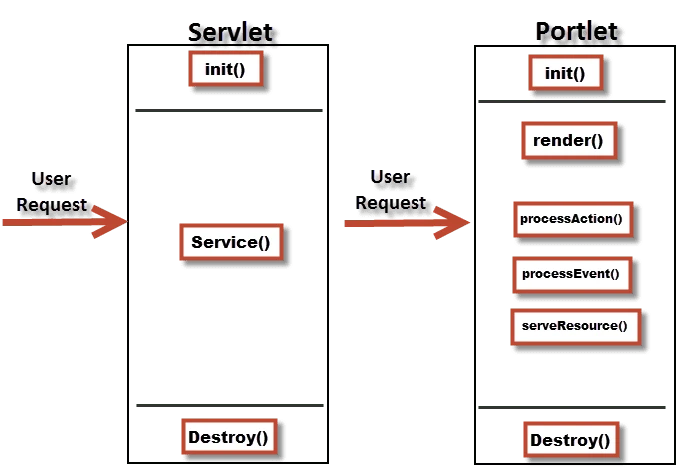
Explanation of Portlet's Lifecycle methods :-
I have given explanation of each Lifecycle methods in separate blog. Follow below blogs to get detail understanding of each lifecylce method.
Portlet Lifecycle method - init()
Portlet Lifecycle method - render()
Portlet Lifecycle method - processAction() - Available soon
Portlet Lifecycle method - processEvent() - Available soon
Portlet Lifecycle method - serveResource() - Available soon
I would recommend looking at index page 'A Complete Liferay Guide' to browse all topics about liferay.
For example, if action() method is completed for one portlet then its' render() method is called along with render() method of all portlet on that page (However Portlet specification doesn't give guarantee about the order of render() method call for portlets on same page ). Thus other portlets on that page are still generating response even though user had not directly interacted with them.
Due to this behavior, Portlet specification defines more than one methods to process user request. These methods represents corresponding Portlet Phases.
JSR-168 (Portlet 1.0) specification initially defines following two phases
- Render Phase
- Action Phase
Later JSR-286 (Portlet 2.0) added following two phases.
- Event Phase
- Resource Serving Phase
Following methods represents these phases. These methods are known as Lifecycle of Portlet.
- init()
- Called when portlet is deployed.
- render()
- Called to render the content. Represent Render phase
- processAction()
- Called when any action performed.
- processEvent()
- Called when any event is triggered.
- serveResource()
- Called when any resource is served with resource URL.
- destroy()
- Called when portlet is un-deployed.
These lifecycle methods are managed by Portlet Container. Portlet container is responsible for
- Loading class of portlet
- Creating and maintaining the portlet instance
- Initializing the Portlet
- Submitting user request to portlet instance
- Destroying portlet instance when it is undeployed.
If you are familiar with servlet, you can easily understand portlet by correlate lifecycle methods of portlet and servlet.
Below diagram describes the lifecycle methods of servlet and portlet.
- There is no direct relation between lifecycle methods of portlet and servet.
- This diagram is just to understand lifecycle methods side by side.
- For both Portlet and Servlet, init() and destroy() methods are called by respective container (Portlet and Servlet container).
- In case of Servlet, all requests are served by service() method
- In case of Portlet, user requests are served by different methods like render(), processAction(), processEvent() and serveResource() based on portlet's current phase.
Explanation of Portlet's Lifecycle methods :-
I have given explanation of each Lifecycle methods in separate blog. Follow below blogs to get detail understanding of each lifecylce method.
Portlet Lifecycle method - init()
Portlet Lifecycle method - render()
Portlet Lifecycle method - processAction() - Available soon
Portlet Lifecycle method - processEvent() - Available soon
Portlet Lifecycle method - serveResource() - Available soon
Portlet Lifecycle method - init()
Init lifecylce method
,
Lifecycle Methods
,
Liferay Development
,
Portlet
,
Portlet Lifecycle
,
Portlet Phase
No comments
:
Initialization phase of Portlet is represented by init() method. When portlet is deployed, portlet container will destroy any existing instance and create new instance of portlet. At this time, it will call init() method.
Like Servlet, Portlet can initialize any back end resource or to do any one time activity in init() method. In short init() method is place for initialization.
As mentioned in Liferay MVC Portlet blog,
Like Servlet, Portlet can initialize any back end resource or to do any one time activity in init() method. In short init() method is place for initialization.
Servlet reads init parameter from web.xml in servlet's init() method. Similarly Portlet reads init parameters from portlet.xml in init() method. Generally these init parameters are used to define page flow of the portlet.
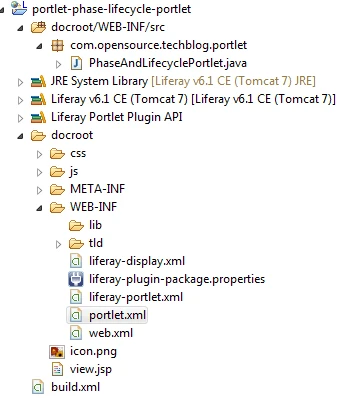
We will see how lifecylce methods works by creating Liferay MVC portlet. Refer my blog on how to create Liferay MVC portlet. Give project name as portlet-phase-lifecycle and eclipse will append -portlet at the end.
I gave portlet class as com.opensource.techblog.portlet.PhaseAndLifecyclePortlet. The project structure looks like below screenshot.
I gave portlet class as com.opensource.techblog.portlet.PhaseAndLifecyclePortlet. The project structure looks like below screenshot.
As mentioned in Liferay MVC Portlet blog,
- GenericPortlet implements Portlet interface.
- LiferayPortlet extends GenericPortlet and provides additional methods.
- MVCPortlet is defined by Liferay. It extends LiferayPortlet and provides MVC architecture by providing more additional methods.
- PhaseAndLifecyclePortlet (our custom portlet) extends MVCPorrtlet.
To understand how init() method works, we will override it in our custom portlet. There are two version of init() methods available in Liferay portlet class hierarchy.
init() method available in MVCPortlet
After Overriding above init() methods (both), our portlet class will look like below code snipped.
Explanation:-

.webp)
I would recommend looking at index page 'A Complete Liferay Guide' to browse all topics about liferay.
init() method available in MVCPortlet
- Signature:- public void init() throws PortletException
- This method having no parameter.
- Signature :- public void init(PortletConfig config) throws PortletException
- This method take PortletConfig as parameter.
- PortletConfig object is used to read portlet configuration (defined in portlet.xml).
- One of the common use of PortletConig object is to read initialization parameter defined in portlet.xml.
- PortletConfig is similar to ServletConfig (which is used to read servlet configuration from web.xml).
After Overriding above init() methods (both), our portlet class will look like below code snipped.
package com.opensource.techblog.portlet;

import javax.portlet.PortletConfig;
import javax.portlet.PortletException;

import com.liferay.portal.kernel.log.Log;
import com.liferay.portal.kernel.log.LogFactoryUtil;
import com.liferay.util.bridges.mvc.MVCPortlet;

public class PhaseAndLifecyclePortlet extends MVCPortlet {

 //define log for this class
 private static final Log _log = LogFactoryUtil.getLog(PhaseAndLifecyclePortlet.class.getName());

 //This method is defined in MVCPortlet
 @Override
 public void init() throws PortletException {
  _log.info(" This is init method without parameter");
  super.init();
 }

 //This method is defined in GenericPortlet
 @Override
 public void init(PortletConfig config) throws PortletException {
  String viewTemplate = config.getInitParameter("view-template");
  _log.info("Init Parameter of viewTemplatei is ==>"+viewTemplate);
  _log.info(" This is init method with PortletConfig parameter");
  super.init(config);
 }
}
Explanation:-
- LogFactoryUtil is util class provided by liferay to get log for current class.
- We have overridden both version of init() method. Added info logs in each method which will be display in server console when this portlet is deployed.
- In second version of init() method, we are reading initialization parameter called 'view-template' and putting into log. 'view-template' init parameter is defined in portlet.xml file and used to define the path of jsp which will render portlet's output.
- As you can see during the deployment of this portlet, init() method overridden from GenericPortlet is called first followed by init() method overridden from MVCPortlet.
- This is because GenericPortlet is located at higher position than LiferayMVCPortlet in class hierarchy.
- Logs also shows the initialization parameter's(view-template) value (/view.jsp) which is defined in portlet.xml file. We can read all initialization parameter in init() method.
Download Source
I would recommend looking at index page 'A Complete Liferay Guide' to browse all topics about liferay.
Portlet Lifecycle method - render()
Lifecycle Methods
,
Liferay Development
,
Portlet Lifecycle
,
Portlet Phase
,
Render
,
Render Phase
,
Render URL
No comments
:
render() method represents render phase of Portlet. During render phase, portlet generates content based on its current state(Normal, Minimize, Maximize). Render method(phase) of all the portlets on same page is called every time when
Override render() method in PhaseAndLifecyclePortlet class and put some logs as per below code snippet.
Explanation:-

Scenario-3 render method is called when action method of any portlet on page is completed.
Its possible in most of the cases that on same liferay page, multiple portlets are placed. If any of them has completed processAction() method then render() method of all portlets on that page will be called. We will see more about this in separate blog.
I would recommend looking at index page 'A Complete Liferay Guide' to browse all topics about liferay.
.webp)
- that page is refreshed or
- portlet's renderURL is called. (triggering render method directly by RenderURL) or
- any of the portlets on that page completes action or event phase
Override render() method in PhaseAndLifecyclePortlet class and put some logs as per below code snippet.
@Override
 public void render(RenderRequest request, RenderResponse response)
   throws PortletException, IOException {
  _log.info(" This is render method of PhaseAndLifecyclePortlet");
  super.render(request, response);
 }
Explanation:-
- render() method is overridden from GenericPortlet.
- In this method we placed log which will be displayed when render method is called.
- At the end of this method, we make call of super.render(request,response). it will call GenericPortlet's render() method to perform some back end processing. (like, send the portlet content to jsp defined in portlet.xml as view-template init parameter).
- Without making call of super.render(), our render method will not work properly.
- render() method takes objects of type RenderRequest(interface) and RenderResponse(interface) as parameters.
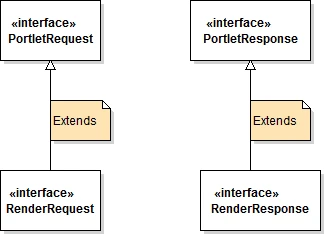
- RenderRequest and RenderResponse are different than ServletRequest and ServletResponse because Portlet doesn't have direct access of objects of type ServletRequest and ServletResponse.
- RenderRequest and RenderResponse extends PortletRequest and PortletResponse interface as per below screenshot
Save PhaseAndLifecyclePortlet class and deploy the portlet. You will see init() method is called during deployment of this portlet because every time we deploy the porltet, Portlet container will destroy existing instance of portlet and will create new instance. This time init() method is called.
render() method of portlet is called in following 3 scenarios.
Scenario-1 render method is called when liferay page is refreshed.
render() method of portlet is called in following 3 scenarios.
Scenario-1 render method is called when liferay page is refreshed.
Deploy the portlet and refresh the page on which this portlet is placed (first you have to place the portlet on some page if its not already placed) and logs in server console looks like below screenshot.
- From the log, you can observe that every time when the page is refreshed, portlet's render() method is called.
- To understand it further, you can develop few more sample portlets and place them all in same page. Put logs in each portlet's render() methods.
- Refresh the page and you will observe that all portlet's render() method is called. However portlet specification doesn't give any guarantee about the order of render method of portlets on same page. Means which portlet's render method is called first is unpredictable.
Scenario-2 render method is called when renderURL is called.
What is render URL ?
Servlets are called by its mapping url (defined in web.xml). Portlet can't be mapped by direct url like servlet. Portlet container provides certain tags / util classes which is used by portlet to generate url which points to itself. In other words this url is referring to portlet that creates it. This url is called Portlet URL. Following are different types of PortletURL.- renderURL (will call render method of portlet)
- actionURL (will call processAction method of portlet)
- serveResourceURL (will call serveResource method of portlet)
Scenario-3 render method is called when action method of any portlet on page is completed.
Its possible in most of the cases that on same liferay page, multiple portlets are placed. If any of them has completed processAction() method then render() method of all portlets on that page will be called. We will see more about this in separate blog.
I would recommend looking at index page 'A Complete Liferay Guide' to browse all topics about liferay.
Download Source
Subscribe to:
Posts
(
Atom
)
